Sensi
- 4.4
- Rating
- 1.00M
- Installs
- Free
- Price

 Analysis by App-foxy
Managing a home thermostat sounds simple until comfort, energy use, and privacy all meet in the same small device. I spent time with Sensi to see whether its mobile approach makes that everyday task clearer or merely adds another layer between me and the temperature on the wall. My impression is that it is most useful when you already have a compatible Sensi thermostat and want a dependable way to check or adjust it without standing in front of it.
This is a free lifestyle app from Copeland LP, aimed at remote home comfort rather than broad smart-home control. It has been available since January 29, 2014, and its long presence is reflected in a 4.4 average from around 46 thousand ratings, with more than a million installs. Those figures do not replace hands-on judgment, but they do suggest that the app has found a practical audience among people who want thermostat access on a phone.
What Sensi feels like in everyday use
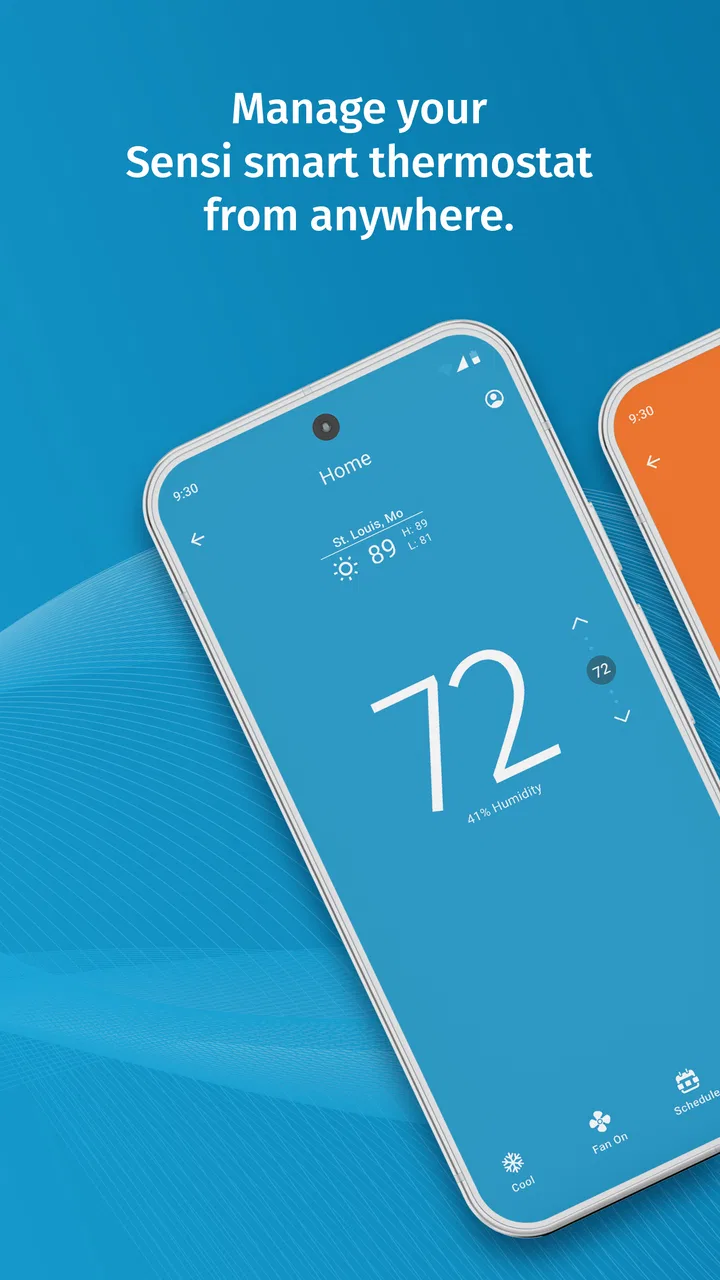
The main appeal is straightforward: the app puts thermostat decisions in a familiar phone interface. Instead of walking to another room to see whether the heating or cooling is running, I can use the app as the control point for the connected thermostat. That is especially convenient in a larger home, a room that is difficult to reach, or a situation where I want to make a change before arriving home.
You May Also Like

 Blood Strike: 2.5 Anniversary
Blood Strike’s Loadouts Turn Every Drop Into a Tactical Gamble
A close look at Blood Strike’s custom loadouts: how fast access to signature weapons reshapes its battle royale rhythm, rewards preparation, and narrows the gap between fights.

 Pandora - Music & Podcasts
Pandora’s Music Is Easy to Start, but Harder to Recover
Pandora’s strength is its low-effort path from a seed to a station. Its weak spot is how much confidence it asks you to place in connection, setup, and quiet recovery.

 8 Ball Pool
 Is Built on Rivalries, Rematches, and Routine
A close look at the rivalries, rematches, shared routines, and unanswered safety questions that turn a quick pool match into a persistent mobile community.

 Samsung Music
’s Quiet Strength Is Playing What You Already Own
Its reach comes less from spectacle than from dependable access to a personal library. That simplicity is both the app’s strongest retention engine and its ceiling.

 AccuWeather: Weather Radar
AccuWeather Review: A Quick, Clear Forecast for Everyday Decisions
For everyday plans, the best forecast is the one you can understand quickly. AccuWeather makes rain timing, radar, and local conditions easy to act on, with a few trade-offs.

 Hill Climb Racing
Why Hill Climb Racing Still Turns Crashes Into One More Run
A tiny car, a bumpy hill and one more upgrade: Hill Climb Racing keeps resurfacing because its simple chaos makes every near-miss feel personal.
More From Our News Desk



The best way to understand its value is through a normal evening. Imagine leaving work and remembering that the house was left warmer than intended. With a conventional thermostat, the correction waits until someone gets home. With Sensi, the useful workflow is to open the app, check the current home-comfort setting, make the adjustment, and then leave it alone. The benefit is not excitement; it is removing a small interruption from the day.
That same convenience works in less predictable situations. If plans change and the house will remain empty longer than expected, a remote thermostat app can prevent the need to keep the previous setting running. If a family member is already home, I can avoid changing the temperature blindly by checking the current state first. The app makes the thermostat more reachable, but it does not turn a simple temperature decision into a complicated smart-home project.
I also appreciate that the product stays focused. Many home-control apps try to become dashboards for lights, cameras, locks, speakers, alarms, and appliances. Sensi is a narrower tool. That can feel limiting to someone seeking one app for an entire home, but it also means the central task is easier to identify: open the app when the thermostat needs attention.
Who benefits most from this approach
Sensi makes the most sense for someone who already uses a compatible Sensi thermostat and wants remote access without depending on a separate general-purpose home platform. It is also a reasonable fit for households where different people need to make occasional comfort adjustments but do not want to walk to the thermostat every time.
Renters and homeowners should think about the hardware relationship before installing it. The app is not a replacement for a thermostat by itself. Its usefulness depends on having the relevant Sensi equipment set up and connected. If you are shopping for a thermostat rather than managing one you already own, the app should be considered as part of that hardware decision, not as a standalone climate-control solution.
I would be more cautious about recommending it to someone who wants a single, brand-neutral control center. If your home already revolves around another smart-home ecosystem, adding a manufacturer-specific app may create a second place to check. That can be worthwhile when direct thermostat control is better, but it is not automatically the cleanest arrangement.
Trust starts with knowing what the app is for
Remote control changes the character of a thermostat. A wall control is visible and local; a phone app can be opened from elsewhere. That makes account access, device selection, and personal control choices more important than they would be with a basic manual thermostat. My trust in Sensi therefore depends less on the promise of convenience and more on whether I can understand what I am changing before I confirm it.
The app’s developer is Copeland LP, and the product is rated for Everyone. That age rating makes sense for the basic task: adjusting home comfort is an ordinary household activity rather than content aimed at a particular age group. Still, an Everyone rating should not be confused with a guarantee that every setup will feel equally simple. The physical thermostat, home network, phone, and account arrangement all affect the experience.
One practical trust habit is to treat the app as a control surface, not as an invisible automation engine. I would open it when I need to make a decision, look carefully at which home or thermostat is selected, and avoid tapping through prompts without reading them. This is especially important in a household with more than one controlled space, because a quick adjustment is only helpful if it affects the intended place.
I also prefer to separate comfort decisions from assumptions about savings. Lowering or raising a setting may suit an empty home, but the app itself cannot decide whether that change is appropriate for pets, plants, guests, weather, or a vulnerable family member. The responsible workflow is to use remote access as a convenience while keeping the household context in mind.
Controls that deserve a deliberate check
The most important control is not the temperature itself; it is the target and location attached to the change. Before confirming an adjustment, I would check the selected thermostat and the current setting, particularly when using the app while distracted. A remote command can be convenient precisely because it is easy to send from another room, so a short pause before confirming is worthwhile.
Account control is another area where I would be methodical. Use a strong, unique password for the account associated with the thermostat, and review who in the household genuinely needs access. Sharing login details casually may seem harmless for a temperature adjustment, but it makes it harder to know who changed a setting later and harder to remove access cleanly when circumstances change.
If a phone is shared, lost, replaced, or handed to another person, I would treat the app like any other home-access tool. Sign out where appropriate, remove old devices from personal use, and avoid leaving an account open on a phone that no longer belongs to you. These are ordinary account hygiene steps, but they matter more when the app can influence a real home environment from a distance.
There is also a useful distinction between an app control and a physical fallback. I would not assume that a phone is always available, charged, connected, or in the hands of the right person. Anyone in the home who may need to manage comfort should know how to use the thermostat itself. That small bit of preparation prevents the app from becoming a single point of failure during a dead battery, network problem, or account issue.
Where privacy questions appear in real life
A thermostat app naturally sits close to household routines. Even when I am only thinking about temperature, the surrounding context can reveal when people are home, when a property is empty, or which household member tends to make changes. I would therefore avoid treating the app as a casual utility with no personal implications.
The safest mindset is to make only the account and device choices needed for the intended use. Read each permission or access request as it appears, consider whether it matches the task, and decline anything that is not necessary for the way you plan to use the app. I would not infer that a permission is harmless simply because the app is in the lifestyle category, nor would I assume that every request has the same importance on every phone.
Data-sensitive moments are often less dramatic than a security incident. They include setting up the account, connecting the thermostat, changing phones, inviting another household member, and troubleshooting a connection. Those are the moments when I would slow down, read the screen, and note which choices are optional. A person who rushes through setup may later forget what was enabled or who was given access.
I would also be careful when using Sensi on a phone that belongs to work, a family member, or a temporary loan arrangement. The phone’s own account, notifications, backups, and lock-screen behavior can affect how much information is visible. The app cannot be judged in isolation from the device carrying it. A private thermostat account on a broadly shared phone deserves more caution than the same account on a locked personal device.
Notifications deserve the same practical attention. If the app displays thermostat-related alerts, decide whether they should appear openly on a lock screen. A notification that seems convenient in the morning might disclose household information when the phone is sitting on a desk or being used by someone else. I would adjust the phone’s notification visibility according to the household’s privacy needs rather than accepting the default automatically.
Keeping control in the user’s hands
Good remote control should make a user feel more capable, not more dependent. With Sensi, that means knowing when to use the phone, when to use the thermostat, and when not to make a change at all. I like the app best when it supports a clear decision: the house is empty, the weather changed, someone is arriving, or a setting needs correcting.
A useful routine is to check the current state before making an adjustment and then check again later only if there is a reason. Repeatedly opening the app without a purpose can turn a simple comfort tool into another source of screen time. The remote feature is strongest when it removes an unnecessary trip, not when it encourages constant monitoring.
For households with multiple decision-makers, agree on a simple rule about changes. For example, one person might handle scheduled comfort choices while others make temporary adjustments only when needed. The app can make access easier, but it cannot resolve disagreements about preferred temperatures. A little household coordination prevents the remote control from becoming a tug-of-war.
I would also keep expectations realistic about connectivity. A phone app is not the same as a direct local button. If the phone has no usable connection, the home network is unavailable, or the thermostat is not communicating properly, the remote workflow may be interrupted. That is not a reason to reject the app, but it is a reason to keep the physical controls familiar and accessible.
The current version is 9.7.0 and requires at least OS 10. That compatibility point matters before installation, especially on an older phone that is still used for household tasks. A free app is not truly convenient if the device cannot run it reliably or if updating the phone would create a separate problem. I would check the operating-system requirement first, then make sure the phone has enough battery and connectivity for the moments when remote access matters.
How it compares with ordinary alternatives
The obvious alternative is the thermostat’s physical interface. That option wins for immediacy: it is already in the home, does not require opening a phone, and remains useful when the mobile experience is unavailable. For a small home with one thermostat and predictable routines, the physical control may be all anyone needs.
Sensi earns its place when distance is the problem. The app is more useful when I am away from the thermostat, when the home is empty, or when I want to make a change before someone arrives. It also avoids the need to remember exactly where the thermostat is located when the household has separate rooms or floors. That convenience is meaningful, but it is not a reason to discard the wall control.
Another alternative is a general smart-home platform. A broader platform may be preferable if you want one place for several brands and device types. The trade-off is that a general dashboard can make a thermostat action less direct, while a manufacturer app may offer a clearer path to the equipment it was designed to manage. I would choose the broader platform for unified household routines and Sensi for focused thermostat access, unless compatibility or account duplication makes that arrangement awkward.
There is also the simplest alternative: asking someone at home to adjust the setting. That works well when another person is present and willing, but it is less dependable when plans change suddenly or when the home is empty. Sensi does not eliminate the need for communication, but it gives me another option when a request would be inconvenient or impossible.
Small habits that improve the experience
My first tip is to label household thermostats clearly if the setup includes more than one controlled space. A remote interface is only as safe as the user’s confidence about which device is selected. Clear names reduce the chance of adjusting a bedroom when the intention was the living area, especially during a rushed morning.
Second, test the complete workflow before relying on it during travel. Open the app from outside the room, identify the thermostat, make a small intentional change, and confirm that the household can still use the physical control. This is more useful than discovering a setup problem when the house is empty or when someone needs comfort adjusted immediately.
Third, decide in advance who should retain account access. If a guest, former housemate, or service provider no longer needs access, remove that access rather than leaving the arrangement untouched. The exact controls available can depend on the account and setup, so I would follow the choices shown in the app carefully instead of assuming every household has identical sharing options.
Fourth, keep the app updated when the phone allows it, but do not treat an update as a substitute for checking the thermostat after a major phone or network change. Updating the mobile software may be routine, while the real-world test is whether the intended thermostat can still be seen and controlled. That distinction helps separate a successful installation from a dependable household workflow.
Finally, use remote access with restraint during unusual weather. A setting that seems sensible for a short absence may not suit a long absence, a sudden cold snap, or a home with special needs. The app makes changes easy, but the person making the change remains responsible for considering the building, occupants, and conditions.
Where the app may frustrate you
The biggest limitation is structural: the app’s usefulness is tied to its thermostat ecosystem. Someone who has not chosen Sensi hardware yet cannot evaluate the mobile experience separately from that purchase. Someone with a mixed collection of smart-home products may dislike maintaining another account and another control surface.
Remote access can also create false confidence. Seeing an app on a phone does not guarantee that every command will be immediate or that the home is responding exactly as expected. When the comfort of a person, pet, or sensitive room depends on the result, I would verify the physical environment rather than relying only on a screen.
There is a learning curve around responsible sharing. A single user may find the app uncomplicated, while a household needs to think about account ownership, phone access, notifications, and who is allowed to change settings. That is not unique to Sensi, but it is an important trade-off compared with a thermostat that anyone standing nearby can operate.
I would also skip it if my priority were a rich automation system spanning many unrelated devices. Sensi is a focused lifestyle app, not a reason by itself to reorganize an entire smart home. Its narrow purpose is a strength for direct thermostat management and a weakness for people who expect extensive cross-device routines from one installation.
My cautious verdict
After using it as a remote thermostat companion, I see Sensi as a practical tool rather than a must-have app for everyone. It solves a specific problem well: making home-comfort adjustments possible when the physical thermostat is out of reach. The free price removes a common barrier to trying it, and the broad adoption and 4.4 average indicate that many people find that convenience worthwhile.
My recommendation comes with a clear condition: choose it because you have a compatible Sensi setup and a real need for remote access, not simply because every household device seems to require an app. Keep the account protected, review access and notification choices, and maintain the physical thermostat as a fallback. Those habits make the convenience more trustworthy.
For a person who regularly arrives home to an uncomfortable room, manages a property from elsewhere, or wants to correct a setting without walking across the house, I would recommend giving it a try. For someone satisfied with a wall thermostat or committed to a different unified smart-home platform, the extra app may not justify itself. In my view, Sensi is at its best when it stays a quiet, focused bridge between you and your thermostat, with the user—not the app—remaining in charge of every comfort and privacy decision.
FAQs for Sensi
01What is Sensi and what does it do?
Sensi is a smart home app designed for controlling and managing Sensi smart thermostats. It allows users to remotely adjust temperature settings, set schedules, and monitor energy usage, all from their smartphone. The app is aimed at enhancing home comfort while promoting energy efficiency.
02Is Sensi compatible with other smart home systems?
Yes, Sensi is compatible with popular smart home systems like Amazon Alexa, Google Assistant, and Apple HomeKit. This integration allows for seamless voice control and automation, making it easier to incorporate Sensi into your existing smart home ecosystem.
03Does Sensi require a subscription or any additional fees?
No, the Sensi app itself does not require a subscription or additional fees. Once you've purchased and installed a Sensi thermostat, you can use the app's features without any ongoing costs. However, ensure your device has internet access for remote functionality.
04Can I control multiple thermostats with the Sensi app?
Yes, you can control multiple Sensi thermostats within a single app. This is particularly useful for users managing multiple zones in a larger home or those with multiple properties. The app allows easy switching between devices and centralized management of all connected thermostats.
05How secure is the Sensi app?
Sensi prioritizes user security by utilizing encryption protocols to protect your data. The app is designed to prevent unauthorized access, ensuring that only you can control your thermostat settings. Regular updates are also provided to enhance security features and address any vulnerabilities.
Pros
- User-friendly interface for easy navigation.
- Highly customizable sensitivity settings.
- Low latency for a smoother experience.
- Supports a wide range of devices.
- Regular updates improve functionality.
Cons
- Limited free features; premium needed.
- Occasional connectivity issues.
- High battery consumption.
- Requires stable internet connection.
- Ads can be intrusive at times.

Sensi
Gallery